PS5 ‘No Signal’ on TV? How to Tell if Your HDMI Port is Broken (And How to Fix It)
You finally have a few hours to sit down and play your favourite game. You boot up your PlayStation 5, the blue light pulses, it turns solid white but your TV screen stays completely black. Then, the dreaded message appears: “No Signal.”
If your PS5 is turning on but not displaying a picture, you are not alone. This is one of the most common hardware issues gamers face today. In most cases, the culprit is a broken PS5 HDMI port.
Before you panic or start looking up the cost of a brand new console, let’s walk through how to diagnose the problem, rule out software glitches, and get you back in the game.
Common Symptoms of a Broken PS5 HDMI Port
How do you know if the port is actually the problem? Look out for these telltale signs:
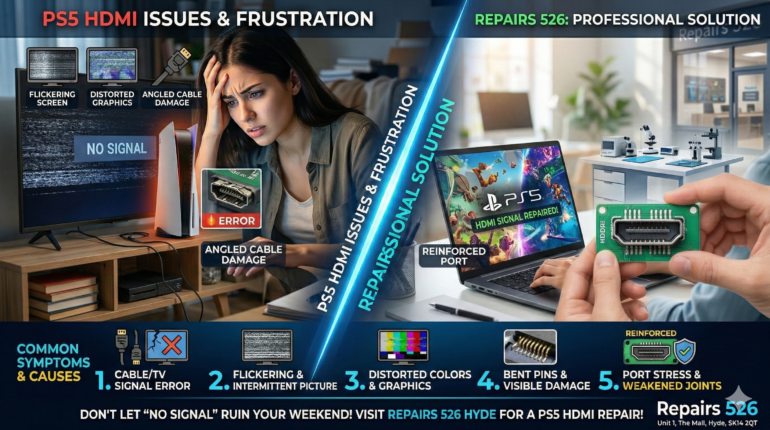
- The “No Signal” Message: Your console turns on (white light), but the TV receives zero input.
- Flickering Screen: The picture cuts in and out, especially if the console is nudged or vibrating.
- Distorted Graphics: You see weird colours, static, or pixelation on the screen.
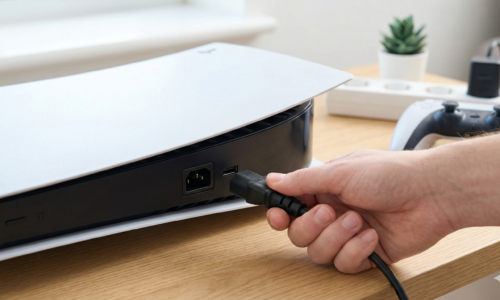
- It Only Works at an Angle: You have to push the HDMI cable up, down, or to the side just to get a picture. (Pro Tip: Stop doing this immediately, as it can damage the motherboard!)
- Visible Physical Damage: If you shine a flashlight into the back of the PS5 and look at the HDMI port, you might see bent pins, pushed in plastic, or a port that wiggles loosely.
Try These Fixes Before Assuming It’s Broken
Before bringing your console in for a repair, try these quick troubleshooting steps to ensure it isn’t just a simple cable or software glitch:
- Test a Different HDMI Cable and TV Port
HDMI cables can fail internally without showing exterior damage. Swap your current cable for a new, high-speed HDMI 2.1 cable. Also, try plugging the PS5 into a different HDMI port on your TV, or test it on a completely different monitor.
- Boot into Safe Mode
Sometimes, the PS5 tries to output a resolution that your TV doesn’t support.
- Turn off the PS5 completely.
- Press and hold the power button until you hear a second beep (about 7 seconds).
- Connect your controller via USB.
- If you can see the Safe Mode menu on your screen, your HDMI port is fine! The issue is likely a resolution setting. You can change your video output settings from this menu.
Why Do PS5 HDMI Ports Break So Easily?
If you’ve confirmed the port is the issue, you might be wondering why it broke in the first place. The PlayStation 5 is a heavy, bulky console. When it sits vertically, the weight of a thick HDMI 2.1 cable constantly pulls down on the port.
Over time, this tension weakens the delicate solder joints connecting the port to the motherboard. Add in the occasional trip over a wire, moving the console between rooms, or aggressively plugging in the cable in the dark, and those tiny copper pins inside the port will easily bend or snap.
Can I Fix a PS5 HDMI Port Myself?
The short answer is: No. Unlike older electronics, repairing a PS5 HDMI port is not a simple DIY job. The port is soldered directly onto the main motherboard with incredibly tiny, fragile pins. Replacing it requires specialized micro-soldering equipment, a hot air rework station, and a microscope.
Attempting to fix it yourself with a standard soldering iron will almost certainly result in melted surrounding components or ripped soldering pads, turning a routine repair into a completely dead motherboard.
The Ultimate Solution: Professional PS5 HDMI Repair in Hyde
If your port is physically damaged or completely unresponsive, the only fix is a board-level replacement. But don’t worry you don’t have to send your console back to Sony and wait weeks to get it returned.
At Repairs 526, we specialize in fast, professional micro-soldering. We don’t just put another factory-standard port back on your board; we upgrade it. We use reinforced, high-quality HDMI ports to ensure your new port is actually stronger than the original one.
Why choose us for your PS5?
- Same-Day Service: We know you want to get back to your games. Most HDMI repairs are completed the same day.
- No Data Loss: We don’t wipe your hard drive. Your game saves and profiles stay exactly where they are.
- Warranty Guarantee: We stand by our micro-soldering work with a comprehensive warranty.
Don’t let a “No Signal” screen ruin your weekend. If you are in Tameside or Manchester, skip the postal delays and bring your console to our dedicated tech lab.
📍 Find us locally at:
Repairs 526
Unit 1, The Mall, Clarendon Square Shopping Centre
Hyde, SK14 2QT
👉 Book your PS5 HDMI Repair today or call us on 0161 368 9469 for a free diagnostic!